Getting started#
NewsOn is two parts: the NewsOn theme (layout, Theme Options, Header and Footer Builder, single-post designs) and the NewsOn Core plugin (the Elementor elements, the demo importer, ads, paywall, newsletter, podcast and accounts). Your content lives in WordPress and the plugin, so it stays when you change themes.
01.1Requirements
| Item | Needed |
|---|---|
| WordPress | 6.2 or newer (tested up to 7.1) |
| PHP | 7.4 or newer |
| Elementor | The free Elementor plugin from WordPress.org (required). Elementor Pro is not needed. |
| NewsOn Core | Version 1.0.0, included in your download (required) |
| WooCommerce | Optional. Only needed for the cart and wishlist items of the Header Builder. |
01.2Install the theme
- Go to Appearance›Themes›Add New›Upload Theme, choose
newson.zipand click Install Now, then Activate. - The NewsOn Setup screen opens by itself once (you can reopen it at Appearance›NewsOn Setup). It has two short steps.
- Step 1 · Plugins — install and activate Elementor and NewsOn Core with the buttons on that screen. The theme also lists both under Appearance›Install Plugins.
- Step 2 · Your homepage — click Browse homepages. It opens NewsOn Core›Homepages, where the one-click import lives (see Full Website import).
If the Setup screen shows “Upload needed” for NewsOn Core, upload newson-core.zip from your download package under Plugins›Add New›Upload Plugin and activate it.
01.3Child theme
NewsOn has a child theme, “NewsOn Child” (folder newson-child). Install and activate it the same way if you plan to edit PHP templates or add code. Theme Options are kept per theme, so set the child theme up before you import the demo. See Child theme & developer hooks.
01.4Licence and updates
NewsOn has no purchase-code screen and no license lock: every feature works right after activation. To update, install the new newson.zip and newson-core.zip from your download over the old ones (WordPress offers Replace current with uploaded when you upload a newer version). Your content and settings are kept.

Full Website import#
One screen does it all: NewsOn Core›Homepages. Import the complete demo in one click, choose which homepage is your front page, bring in a single page, or remove everything again.

02.1Import the Full Website
The Full Website card (marked “Recommended”) imports the whole demo: the main homepage and its 23 pages (About, Contact, All News, Authors, Subscribe …), all 50 homepages with their footers and menus, the demo stories, authors, categories, series, polls, podcast and ads, the photos, the header with the mega menu, the sidebar widgets and Theme Options.
- Open NewsOn Core›Homepages and click Import Full Website.
- Confirm the dialog “Import the Full Website?”. It tells you that Theme Options, widgets and the front page are replaced — and that they come back if you remove the demo later.
- Keep the tab open while the progress list runs: “Checking your site”, “Photos …”, “Authors, categories and series”, “Stories …”, “Header and mega menu”, “Main homepage and its 23 pages”, one line per homepage, “Theme Options, widgets and front page”, “Finishing”.
- When it is done, the main homepage is your front page. Visit the site.

02.2Progress, pause and resume
- The import runs in small steps (a few seconds each), so it works on modest hosting. You can Pause and Resume.
- If the server needs a moment, the screen says “The server needed a moment — trying again…” and retries by itself.
- If the tab closes, or the computer sleeps, open the screen again: “An import is still unfinished.” offers Resume or Cancel import. It continues exactly where it stopped.
- Running it again never makes duplicates. The button then reads Import again (adds anything missing).
02.3Choose your front page
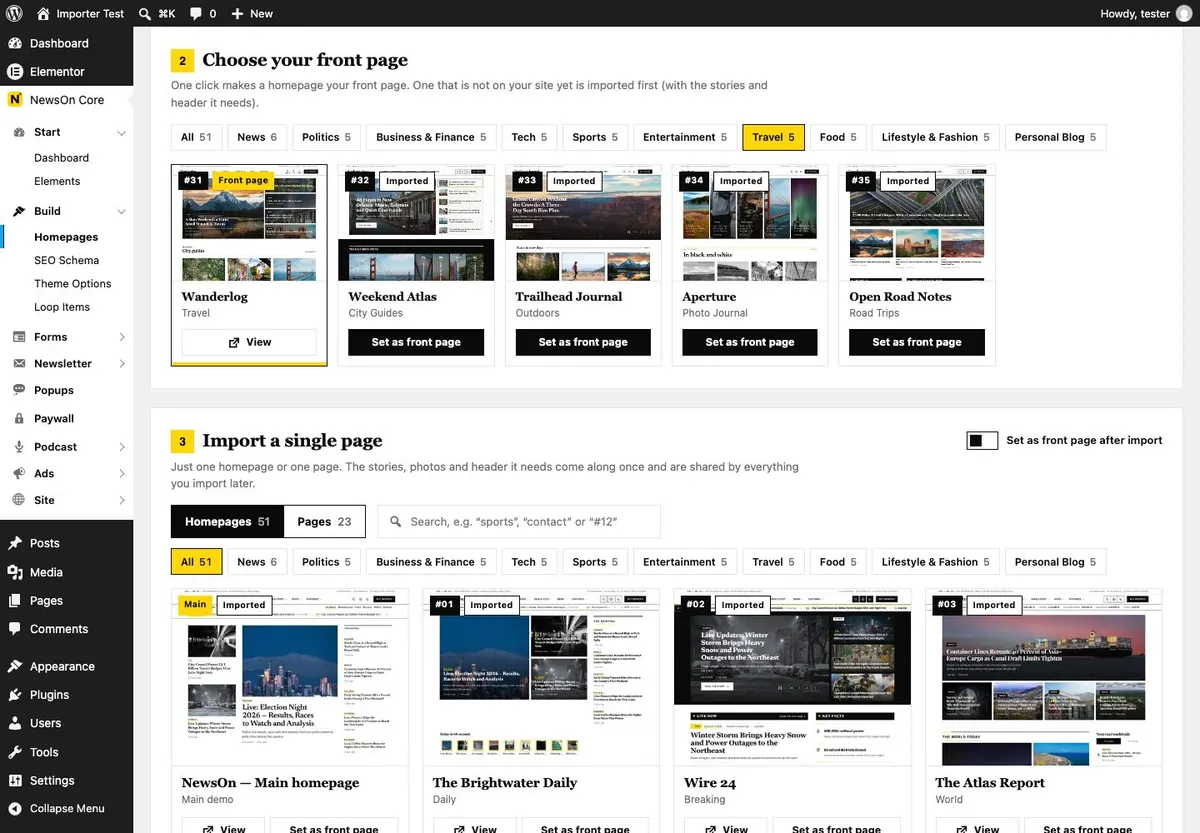
The second card shows every homepage as a thumbnail with tabs for All and each of the 10 categories. Click Set as front page on one you have imported, or Import & set as front page on one you have not — it is imported first, then set.
02.4Import a single page
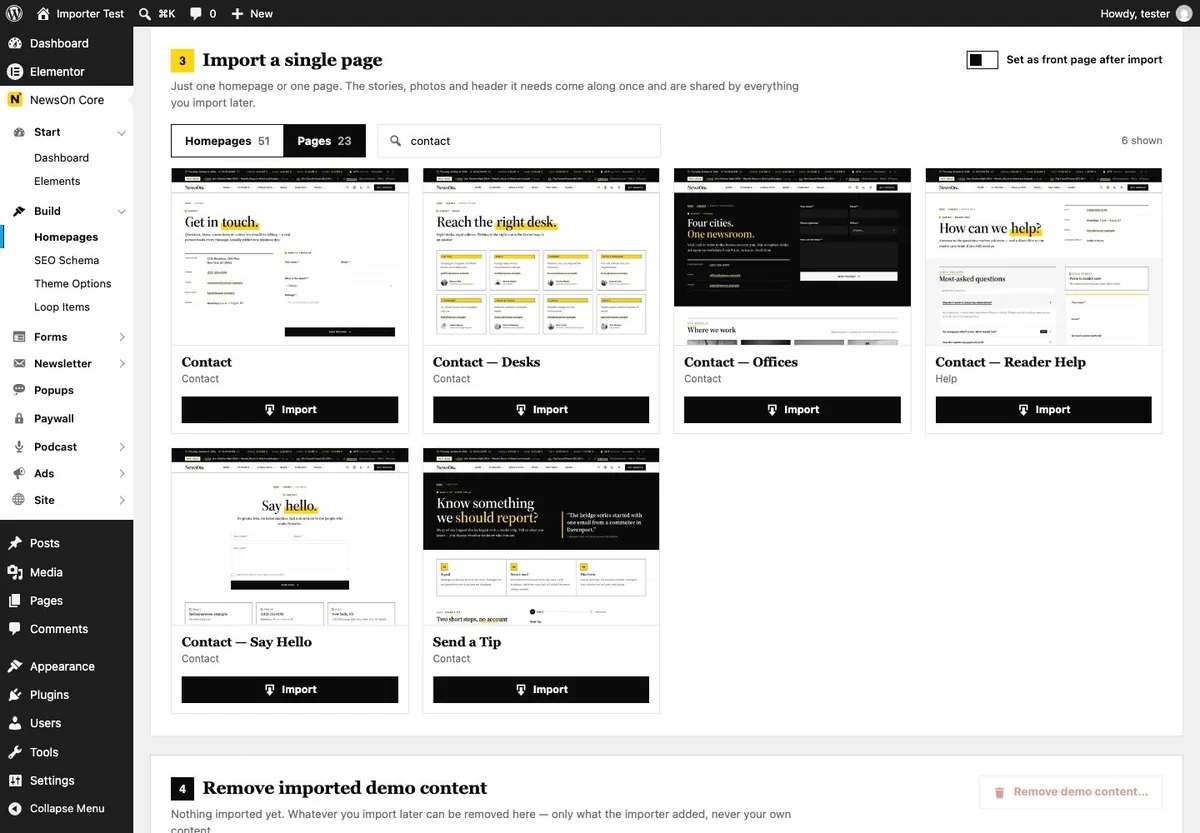
Want only one homepage, or only the Contact page? Use Import a single page. Switch between Homepages and Pages, search (for example “sports”, “contact” or “#12”), and turn on Set as front page after import if you want it on the front. The stories and the header it needs come along the first time.
02.5Remove imported demo content
Remove demo content… deletes only what the importer created (pages, stories, photos, menus, templates) and then restores your previous front page, Theme Options and widgets. Tick “I understand this cannot be undone…” to confirm.
Edits you made to demo pages are deleted with them. Copy anything you want to keep into a new page first.
02.6Hosting tips
- Permalinks: the demo looks best with “Post name”. The screen shows a tip when yours are “Plain” — change them under Settings›Permalinks.
- Time limits: each step asks for 120 seconds and raises the memory limit for the request, but most steps finish in about four seconds. A slow host just means more steps.
- Memory: 256 MB (
WP_MEMORY_LIMIT) is comfortable for Elementor and the import. - Session expired? Reload the page and sign in again — the import continues where it stopped.
- Downloads: if a package is not bundled with the plugin, it is downloaded from the NewsOn download server into
uploads/newson-kits. If that fails, check that your server may make outgoing HTTPS requests.
Import on a fresh site, or on a staging copy of a live one. The import replaces Theme Options and the front page (and gives them back when you remove it).
Homepages#
NewsOn comes with the main homepage plus 50 homepages in 10 categories of five. Each one is a complete front page built from NewsOn Core elements, and any of them can be your front page.
| Category | Homepages |
|---|---|
| Politics | 06 The Capitol Brief, 07 The Rotunda Sheet, 08 Ballot Line, 09 Plainly, 10 The Forum Review |
| Business & Finance | 11 The Market Ledger, 12 Pocketwise, 13 Open House Daily, 14 Seed Round, 15 The Insider Desk |
| Tech | 16 Circuit Daily, 17 Neural Notes, 18 Respawn Weekly, 19 Field & Lab, 20 Torque Street |
| Sports | 21 Gameday Herald, 22 Fourth & Long, 23 Full Court, 24 Pitchside, 25 Scoreline Live |
| Entertainment | 26 Marquee Buzz, 27 Reel Talk, 28 B-Side, 29 The Arts Room, 30 The Daily Rundown |
| Travel | 31 Wanderlog, 32 Weekend Atlas, 33 Trailhead Journal, 34 Aperture, 35 Open Road Notes |
| Food | 36 Salt & Supper, 37 Weeknight Table, 38 The Dining Room, 39 Market Basket, 40 Passport Plates |
| Lifestyle & Fashion | 41 Hemline, 42 Slow Sunday, 43 Nook & Beam, 44 Well Told, 45 Little Rooms |
| Personal Blog | 46 Notes from Sophie, 47 Plain Text, 48 The Long Form, 49 Inbox Edition, 50 The Margin |
| News | 01 The Brightwater Daily, 02 Wire 24, 03 The Atlas Report, 04 The Champlain Courier, 05 Edition Zero |
03.1Set a homepage as the front page
- Open NewsOn Core›Homepages and scroll to Choose your front page.
- Pick a category tab, or Show all.
- Click Set as front page (or Import & set as front page).
You can also do it the WordPress way: Settings›Reading›Your homepage displays›A static page and choose the page.
03.2Each homepage keeps its own fonts
The site itself uses Source Serif 4 for headings and IBM Plex Sans for text (Theme Options → General → Typography). Every homepage brings its own font pair, which is printed only on that homepage (and on the stories and pages that belong to it), so one homepage never changes the look of the rest of the site. The shared header always keeps the site fonts.
03.3One shared header
All homepages use the same header with the mega menu, imported once. The name in the header follows the homepage being viewed. Each homepage has its own footer and menu.
Want only a few sections of a homepage on another page? Use the Page Composer — it adds single sections from the homepages to any page.
Header & mega menu#
There are two ways to build a header: the shared mega-menu header that the demo uses (an Elementor template with the Mega Menu Builder element), or the theme’s drag-and-drop Header Builder with 20 news presets.

04.1The mega-menu header
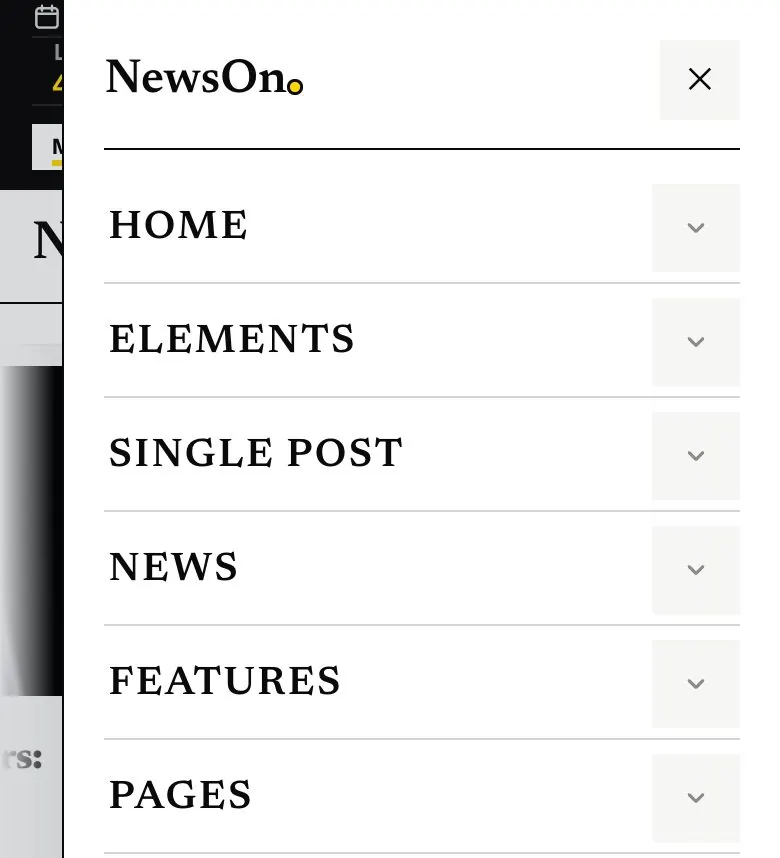
It is the Elementor template “Header (mega menu)”, set under Theme Options›Header›Header design. To change it, open that template from Elementor’s Saved Templates list and edit the Mega Menu Builder element. Its menu:
| Item | What the panel shows |
|---|---|
| Home | Every homepage, grouped in the 10 categories, with previews. |
| Elements | Every NewsOn Core element, grouped, linking to its demo page. |
| Single Post | The 20 single-post designs with thumbnails, each linking to a real story. |
| News | The latest four stories of the category you point at (Politics, Business, Tech, Sports, Entertainment, World), loaded live. |
| Features | Newsroom tools, Reading & media, For readers. |
| Pages | About, Contact, Authors, Search & 404, Reader, Work with us, Coming soon, Legal and Help (this documentation). |
Panels load only when they are opened (“Load Every Panel When Opened”), so the page stays light. While a panel loads, a small loader shows — Panel Loader: Square grid (3 × 3), Single square or None, with a Minimum Loader Time of 400 ms so it never flickers.


04.2Top bar with world clocks
The dark bar above the menu is the News Top Bar element: the date, a live clock (New York) and world clocks (London, Dubai, Tokyo, Sydney …), the weather, a “Most read” ticker and trending tags. Turn World clocks on and add cities in the Cities list (City + Time zone). On desktop four clocks fit; on phones the bar is shortened.
04.3Header tools
| Tool | What it does |
|---|---|
| Search | Opens a window with live results as you type, “Popular” chips and keyboard navigation (↑ ↓, Enter, Esc). Choose “Centered window” or “Full screen”. |
| Accessibility | Opens the accessibility panel (text size, contrast, readable font, reading guide …). See Accessibility. |
| Day / night | Switches the whole site between light and dark and remembers the choice. |
| Account | Opens the Sign in / Create account window. See Reader accounts. |
Pick the tools under the element’s Header Tools (search, accessibility, dark mode) section, and the look under Icon style (Outline, Squares with a 1px border, Solid black squares, One bordered group, Circle buttons, Icon with a small label, Text labels).

04.4Header Builder (20 presets)
Open Appearance›Header Builder. Drag elements into the Top bar, Main row, Bottom row and Off-canvas panel (each with Left / Center / Right zones), separately for Desktop and Mobile.
- Click Presets, filter (With ticker, Masthead, Search bar, Email sign-up, Dark, Floating, Minimal) or search, and click Use this preset.
- Adjust anything: logo, menus, search, account, buttons, social icons, subscribe, the Mega menu, Header tools and the News top bar (world clocks) block.
- Set row options: Sticky (Not sticky / Always visible / Hide on scroll down, show on scroll up), Transparent over the hero, Shape (Edge to edge / Floating capsule / Floating card).
- Tick Use this header on my site and click Save.
- Daily Classic
- Broadsheet Masthead
- Wire Desk
- Search Portal
- Centered Nameplate
- Morning Briefing
- Minimal Desk
- Night Desk
- Frosted Capsule
- Metro Three-Tier
- Split Masthead
- Stacked Masthead
- Breaking News
- Sections Overlay
- Search Strip
- Tabloid Front
- Compact Line
- City Desk
- Opinion Capsule
- Live Desk

The Header Builder is used only where no Elementor header design is chosen. After a demo import the site uses the mega-menu template — to switch, set Theme Options›Header›Header design to none, or pick “Header Builder” for one page under Page Options → Header.
Per page: Page Options›Header offers Site default, Theme header, No header, a saved template, Header Builder, a Header Builder preset, or a custom header for that page — plus Transparent and Sticky.
Footer Builder#
Build the footer in Appearance›Footer Builder with four bands — Top band, Main row, Brand band and Bottom bar — or start from one of 12 presets.
- Newsroom Columns
- Tip Line Desk
- Most Read
- Daily Masthead
- Minimal Center
- Broadsheet Wordmark
- Morning Briefing
- Headline Ticker
- Night Edition
- Editions Bar
- Columnist Journal
- Send a Tip
- Open Appearance›Footer Builder and click Presets.
- Edit the blocks: link columns (from the footer menu, a menu you choose, pages or categories), Custom links (one per line,
Label | link), logo, about text, newsletter, most read, headline ticker, giant wordmark, social icons, legal links, copyright and Back to top. - Tick Use this footer on my site and Save.

05.1Which footer is shown
In this order: the page’s own choice (Page Options → Footer), then an Elementor footer design (Theme Options›Footer›Footer design), then the Footer Builder, then the theme’s default footer. The demo homepages use their own Elementor footers.
05.2One back-to-top button
A page never shows two “back to top” buttons. The theme’s button (Theme Options›General›“Back to top” button, on by default) is the one used site-wide; footer blocks with their own button step back while it is on, and a Scroll to Top element on a page hides it. Developers can switch it with the filters newson_global_totop and newson_footer_totop (see hooks).
Page Composer#
Make unlimited pages without starting from zero. On every page edit screen, the box “Page Composer — header, page, footer” walks you through three steps.

- Header Builder — pick one of the 20 header presets for this page, or “Site default”.
- Page Builder — choose Full pages (any homepage design, filter by category, search) or Sections (single sections from the homepages, grouped as Lead stories, Story blocks, Live & scores, Video & audio, Opinion & polls, Newsletter & follow). Click sections in order to stack them, choose Replace the page content or Add below the current content, then Add to page.
- Footer Builder — pick a footer preset, or “Site default”.
- Click Update / Publish, then Edit with Elementor to change texts and stories.
The sections are filled with stories and categories that exist on your site, and only the photos they use are added. Nothing on the page changes unless you pick something. Inside Elementor, Page Settings›NewsOn Page Composer has the same Header / Footer choice.
Step 2 needs NewsOn Core and Elementor. Steps 1 and 3 work with the theme alone.
Theme Options#
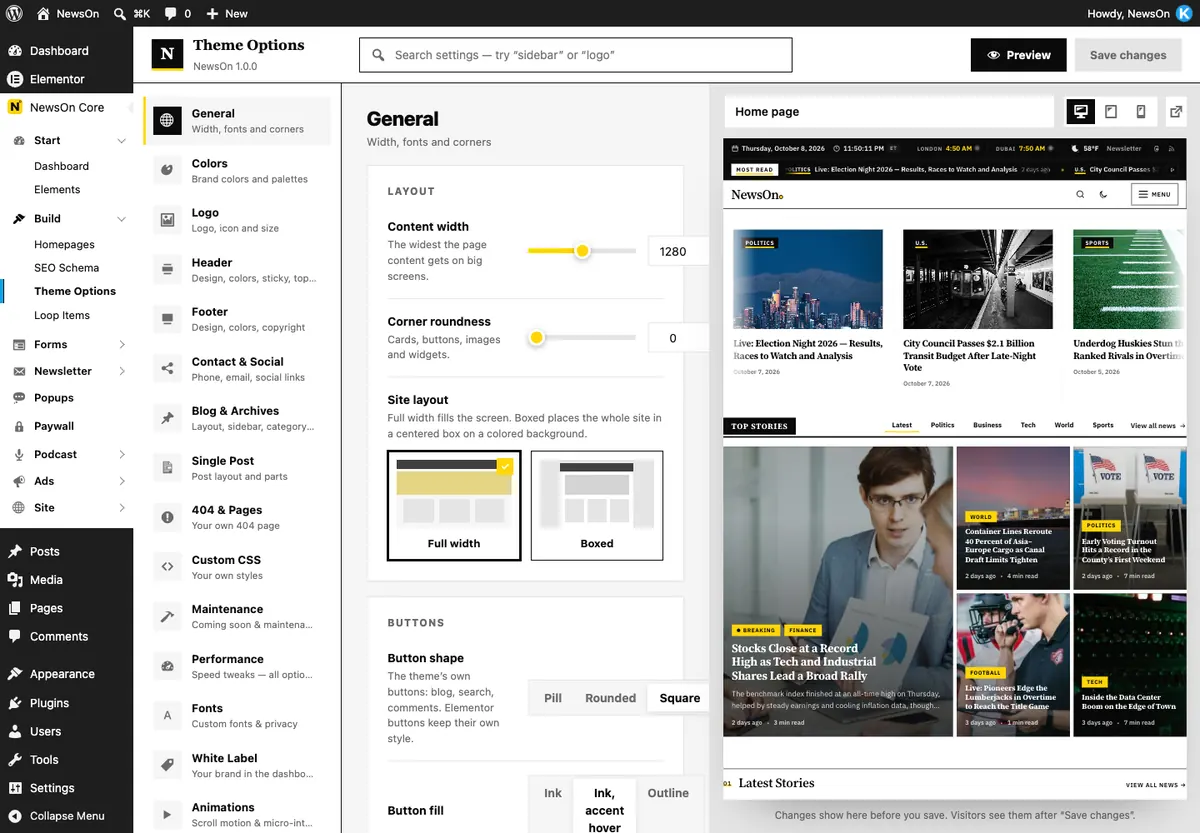
All site-wide settings are on one screen: NewsOn Core›Theme Options (or Appearance›Theme Options when the plugin is off). Changes show in the live preview on the right before you click Save changes; the search box finds any setting.
| Tab | Important settings (default) |
|---|---|
| General | “Content width” (1280 px), “Corner roundness” (0), “Site layout” Full width / Boxed, “Button shape” (Square), “Back to top” button (on), “Preloader”, Typography: “Font pairings” (12), “Body font” (IBM Plex Sans), “Heading font” (Source Serif 4), “Body text size” (17). |
| Colors | “Quick palettes” (Signal Yellow, Deep Yellow, Graphite), “Full color presets” (Paper, Newsprint, Night, Graphite, Homepage), “Accent” (#FFD60A), “Ink (accent 2)” (#0a0a0a), headings, body text, page background. |
| Logo | Logo, site icon and size. |
| Header | Header Builder link, “Header design” (an Elementor template), style, sticky, transparent, top bar, search button, main button. |
| Footer | Footer Builder link, “Footer design”, style, call-to-action band, newsletter form, about text, copyright. |
| Contact & Social | Phone, email and social links used by headers and footers. |
| Blog & Archives | “Blog layout” (sidebar right / left / full width), extra “Sidebars”, “Sticky sidebar” (on), 16 post-list layouts, columns, card style, excerpt length, “More posts” (Page numbers, Newer / Older, Load more button, Infinite scroll), 9 page-header designs. |
| Single Post | 20 designs, layout, parts, “Previous / next design”, “Read next pop-up”, “Article extras”. See Single posts. |
| 404 & Pages | Your own 404 page (“Page to show”). |
| Custom CSS | Your own styles. |
| Maintenance | Coming soon and maintenance mode. |
| Performance | Optional speed tweaks. See Performance. |
| Fonts | “Load Google Fonts from your own server”, Custom Fonts. |
| White Label | Your own name for NewsOn Core in the dashboard. |
| Animations | “Animate blog, post and 404 pages”, “Animation pace”, “Magnetic buttons”, “Springy post cards”, “Progress ring on ‘Back to top’”, “Between pages” (None / Soft fade / Color curtain). |
| Import / Export | Back up, move or reset settings. |
07.1Site width, colors and fonts
“Content width” sets the width of headers, footers and pages (the demo uses the same edge everywhere). NewsOn is black and white with one accent color; the accent is used for fills, lines and markers, and text placed on it is dark so it stays readable. Pick a font pair under Font pairings or set the body and heading fonts yourself.
07.2Blog and archive layouts
Choose one of the 16 post-list layouts: Card grid, List, Zig-zag, Masonry, Magazine, Hero first, Two featured, Overlay cards, Bento grid, Classic big image, Compact cards, Timeline, Newspaper, Headlines, Minimal text and Photo tiles. “Per page type” lets the blog page, categories, tags, authors, search and date archives each use their own page header.
07.3Single post settings

- Single post design — 20 cards (default Classic). A post can override it.
- Previous / next design — “Different on every post” (default) gives each post one of the 10 navigation layouts; or choose one layout, or “Theme style”.
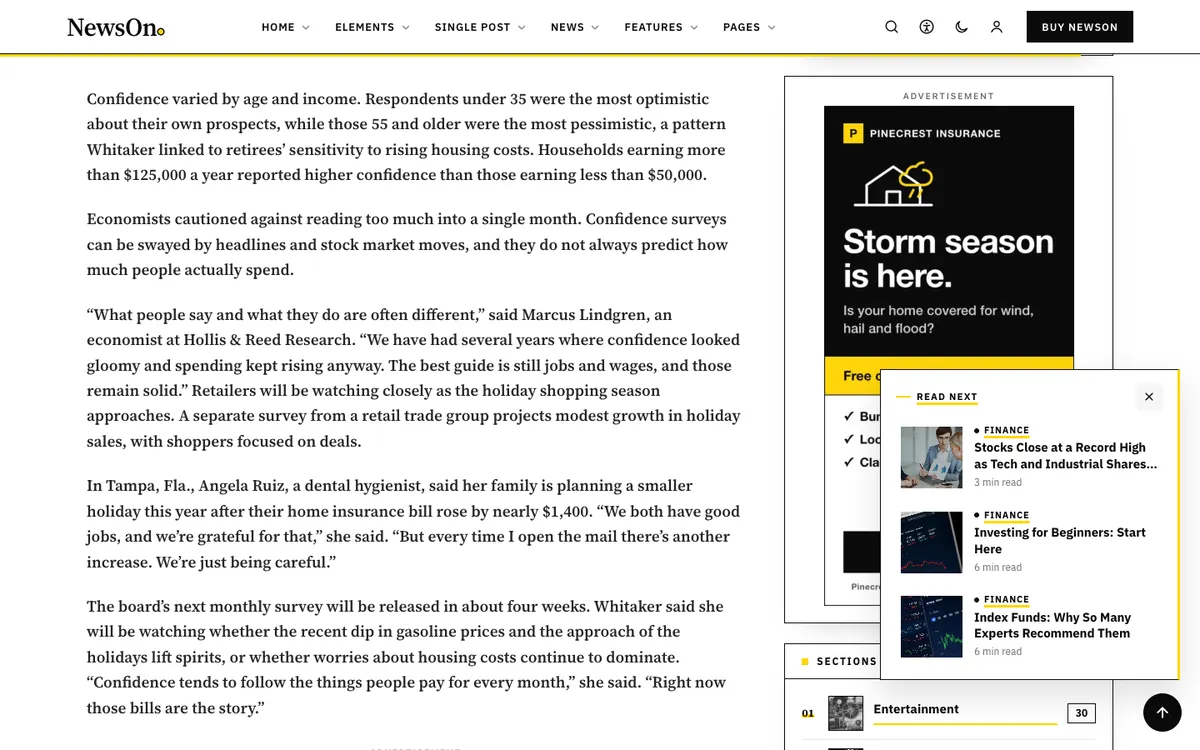
- Read next pop-up — “Read next card” (on), “Slides in from” (Changes per post / Left / Right), “After the reader closes it” (This post only / Hide for 30 minutes / Hide for the visit).
- Article extras — Drop cap, Reading progress line, Contents box on long posts, Listen & text size, Newsletter sign-up in the story, “More from” the category (all on).
07.4Sticky sidebar and animations
Sticky sidebar (Blog & Archives, on by default) keeps the sidebar in view while the story scrolls; a page can change it under Page Options›Sidebar›Sticky sidebar. Animations are soft and short, and they honour the visitor’s reduced-motion setting.
Single posts#
Every story can look different: 20 designs, 10 previous / next layouts, a Read next card and six article extras that are added automatically — no editing of posts needed.

08.120 designs, per post
- Classic
- Editorial
- Big picture
- Photo overlay
- Split screen
- Magazine
- Minimal
- Boxed card
- Newspaper
- Long read
- Side rail
- Video first
- Dark reading
- Photo essay
- Developer
- Lifestyle
- Bold
- Parallax
- Framed photo
- Side by side
- Set the site-wide design in Theme Options›Single Post›Single post design.
- To give one story its own design, open the post and use the Post Options box → Layout → Theme design. “Use the global setting” follows Theme Options.
- An Elementor single-post design (Post Options → Layout → “Single post design”) wins over both.
08.2Previous / next navigation
Ten layouts: Cards, Image tiles, Split banner, Minimal text, Arrows with hover preview, Edge tabs, Up next, Series (previous · current · next), Pills and Magazine. With “Different on every post” neighboring stories never look the same. To fix one post, add the custom field _newson_post_nav with a layout key (cards, image, split, minimal, arrows, edge, upnext, series, pills, magazine) or theme.

08.3Read next
When a reader is about 60% through a story, a small card with up to three stories from the same category slides in from the left or right. The × hides it only for that story by default, so it is there again on the next one.
08.4Article extras
| Extra | Where and when | Key |
|---|---|---|
| Drop cap | A large first letter on the opening paragraph; its style follows the post design. | dropcap |
| Reading progress | A thin accent line under the sticky header fills as the story is read. | progress |
| Contents | A folded “In this story” list after the first paragraph, on posts with four or more sections. | toc |
| Listen & text size | ▶ Listen reads the story aloud with the browser’s own voice; A− / A+ change the text size (remembered). | tools |
| Newsletter | A one-line sign-up about halfway through longer posts; not on premium posts. | newsletter |
| “More from” | Three more stories from the category after the author box. | more |


08.5Turn extras off on one post
Switch an extra off everywhere in Theme Options›Single Post›Article extras. For a single post, open Custom Fields (block editor: ⋮ → Preferences → Panels → Custom fields) and add:
Name:  _newson_si_off
Value: newsletter, toc (or: all)Accepted values: dropcap, progress, toc, tools, newsletter, more, or all.
Sidebar widgets#
NewsOn Core adds eleven sidebar widgets, all named “NewsOn · …”. The demo import places nine of them in the Blog sidebar.
| Widget | Highlights |
|---|---|
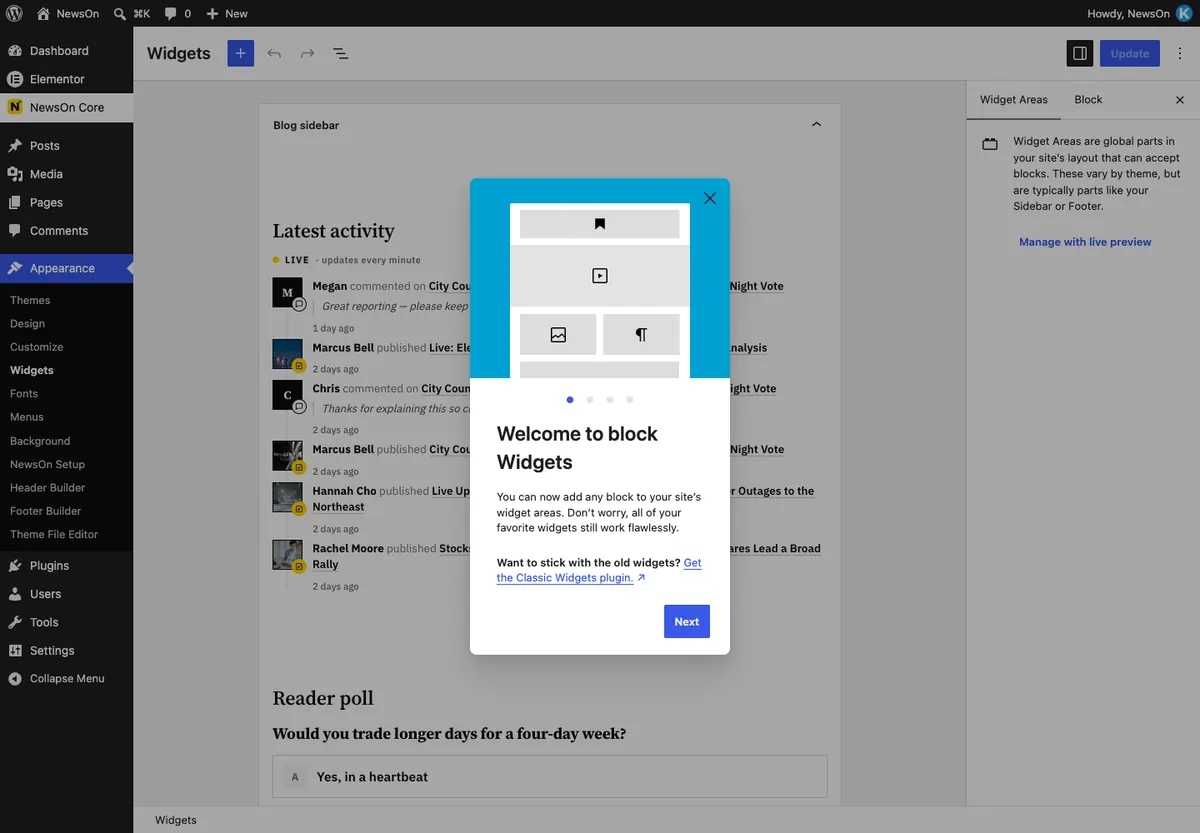
| NewsOn · Latest Activity | New stories, reader comments and (optionally) new members; “Auto-scroll upward (one row at a time)” with a pause of 2–6 s; “Rows visible” (4); “Hide commenter names”. |
| NewsOn · Reader Poll | Shows a poll (the latest by default); readers vote without reloading. |
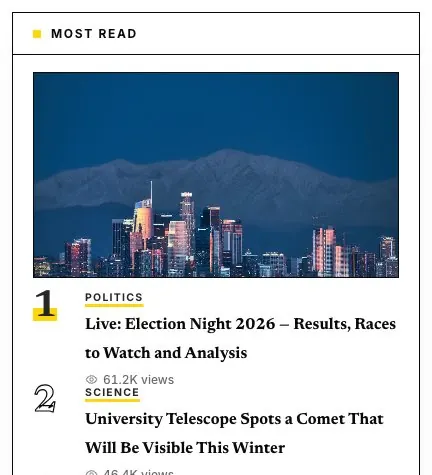
| NewsOn · Most Read | “How many” (5), “Views from” (last 7 days), photo on the first story, view counts. |
| NewsOn · Weather | “City” (New York), units, “Next days” (4), weather data from Open-Meteo (no key) or OpenWeatherMap. |
| NewsOn · Banner / Ad | An Ad Manager ad or group, or an image banner, with a small “Advertisement” label. |
| NewsOn · Categories | Sections with counts, photo from the newest story, size bars, rank numbers. |
| NewsOn · Newsletter | Sign-up straight into NewsOn Newsletter subscribers (“Add to list”). |
| NewsOn · Trending Tags | The most-used tags (12). |
| NewsOn · Follow Us | Networks with follower counts (network | count | link, one per line). |
| NewsOn · Editor’s Pick | One story by ID, or the newest sticky post. |
| NewsOn · Latest Posts | A compact list of recent stories. |
- Go to Appearance›Widgets and open Blog sidebar.
- Add a block, search “NewsOn” and pick the widget. Set its options and click Update.
- More sidebars: add names (one per line) under Theme Options›Blog & Archives›Sidebars.

Show a sidebar inside an Elementor page with the shortcode [newson_sidebar id="sidebar-1"].
Elements#
NewsOn Core adds 106 elements to Elementor, in the panel category “NewsOn Core”. Every one has a live demo page — browse them all at the Elements index.
Turn elements you do not use off in NewsOn Core›Elements (filter All / Active / Inactive, search, one switch per element, and a Demo link). Turned-off elements load nothing.

Posts & news 40
- Loop Grid
- Post Grid
- Post Masonry
- Post List
- Post Classic
- Post Minimal
- Post Carousel
- Post Ticker
- Magazine Blocks
- Trending Posts
- Hero Slider
- Overlay Blog Layout
- News Top Bar
- Live Blog
- Reader Poll
- Web Stories
- Read Next
- Post Series
- Authors Grid
- Author Box
- Paywall / Content Lock
- Ad Manager
- Newsletter
- Category List / Grid
- Breadcrumbs
- Table of Contents
- Post Navigation
- Post Comments
- Post Parts
- Archive Posts
- Search Box Advanced
- Social Share Icons
- Social Follow
- Social Media Feed
- Podcast Episodes
- Bento Grid
- Hover Reveal List
- Scrollytelling
- GSAP Scroll Scenes
- Motion Effects (Motion JS)
Editorial & type 9
- Text Reveal on Scroll
- Gradient Text Marquee
- Highlighted Text
- Animated Text Pro
- Drop Cap
- Advanced Heading
- Section Heading
- Page Header
- Divider & Spacer
Data journalism 8
- Data Table
- Pie Chart
- Bar Chart
- Timeline Vertical
- Timeline Horizontal
- Countdown Timer
- Comparison Table
- Code Snippet Block
Media 9
- Advanced Gallery
- Image Carousel w/ Thumbnail
- Image Comparison
- Image Hotspot
- Video Popup / Modal
- Sticky Video Window
- Video Playlist
- Audio Player Pro
- Image Accordion
Content, money & forms 23
- Dual Button
- Advanced Button
- Call to Action
- Info Box
- Icon Box
- Advanced Tabs
- Advanced Accordion
- Toggle Content
- Unfold / Read More
- Counter Up
- Team Member Grid
- Banner / Promo Box
- Pricing Table
- Affiliate Product Card
- Recipe Card
- Donation / Fundraising Box
- Form Builder
- CF7 Styler
- WPForms Styler
- Mailchimp Styler
- User Login Form
- User Registration Form
- Modal Popup Box
Site parts 17
- Site Header
- Site Footer
- Saved Template
- Mega Menu Builder
- Off-Canvas Content
- Notification Bar
- Cookie Consent Banner
- Language Switcher
- Dark Mode Toggle
- Accessibility Toolbar
- Page Scroll Progress Bar
- Scroll to Top
- Preloader
- Interactive Cursor
- Custom Scrollbar
- Weather Widget
- Sports Scores
10.1Key news elements
| Element | What stands out |
|---|---|
| Magazine Blocks | Show latest, by category or tag, most read, trending, most commented or hand-picked; 14 layouts; “Show more” with arrows or a Load more button (no page reload); 5 skins. |
| Overlay Blog Layout | Text on photos in 13 arrangements; Category tabs with “Load tabs with AJAX”, switch on hover or click, and a loader (Square grid 3 × 3, Skeleton tiles or None). |
| Bento Grid | Tiles from 1×1 to a 3×2 hero; hover effects Lift, 3D tilt, Border beam, Zoom image, Dim the others. |
| Hero Slider | 14 layouts (Full-width, News slider + list, Split, Coverflow, Filmstrip …), autoplay, pause button, 01 — 05 counter. |
| Post Carousel | Slide, Coverflow, Hero, Stacked Deck, Marquee (one or two rows, “Moves left / Moves right”, speed), Bento, Featured Magazine. |
| News Top Bar | 10 layouts incl. “World clocks — several cities” and “Breaking band”; live clock, ticker, weather, trending, social. |
| Live Blog | Updates typed Update, Breaking, Quote, Big number, Photo, Video, Score change; pin and key moments; sports scoreboard; checks for new updates while open; editors can post from the page. |
| Reader Poll | Single, multiple, image choice, emoji reactions, rating, this-or-that; trivia answer; closing date; live results. |
| Paywall / Content Lock | Lock part of a page; unlock by logging in, a role, an email or an access code; plans with prices. |
| Post Series | Series box, previous / next bar, timeline, steps, cards and more; “Coming soon” parts; remembers what was read. |
| Ad Manager | An ad or a rotating group, in the page, as a sticky bottom bar or a floating card; lazy loading; “Advertise here” box when empty. |
| Newsletter | 9 layouts incl. sticky bar, popup and slide-in; lists, consent checkbox, free download. |
| Web Stories | Story rings, 9:16 cards rail or grid, inline player; watched stories turn grey. |
| Podcast Episodes | 8 looks (episode list, cover carousel, studio waveforms …) for your shows. |
| Authors Grid | Your reporters with desk filter tabs, search, ranking and a verified badge. |
| Archive Posts | Category / search / author lists with the Filter, Sort & Search Bar. See All News. |
| Post Ticker | Breaking ticker as marquee, rotator or vertical feed, with live clock and label badge. |
Every element has NewsOn Display Conditions (Advanced tab): show or hide it by login, role, first or returning visit, date, day, time or page type.
Section Heading#
The title above a block of stories — number, title, kicker, right-side text and a “View all →” link — as one element you edit in the Elementor panel. Every section title of the demo (main homepage, the 50 homepages, the Pages, the footer) uses it. Demo: Section Heading.
11.1Add one
- Edit the page with Elementor and search the panel for Section Heading (category “NewsOn Core”).
- Drag it above the block it introduces (Magazine Blocks, Post Grid, a carousel …).
- Type the Title. Put { curly braces } around a word to highlight it.
- Optional: Kicker / subtitle, Right-side text (e.g. “This week”), Link text + Link (the arrow is on by default), HTML Tag (H2, H3, H4 or p).
11.2Numbers
Number has three choices: None, Auto and Custom. Auto counts the auto-numbered headings of the page from the top — 01, 02, 03 … — so when you move a section up, or delete one, the others renumber themselves. Custom prints exactly what you type. The Black bar style shows its number in yellow on black.
11.3Styles
Look›Style offers 18 styles — the ones the demo uses:
| Style | Looks like | Used on |
|---|---|---|
| Numbered rule | 01 · title on a thin black rule, “View all →” on the right (dark version on black bands) | Main homepage |
| Black bar | Title in a black bar, yellow number, “This week” on the right | Main homepage (Most read) |
| Small label | Small capitals on a 3px rule | Main homepage (Our columnists) |
| Index number · Tick rule · Kicker + big title · Double rule · Block label · Broadsheet folio (§ 01) · Title + line · Dash + italic · Minimal | The nine heading looks of the homepages | The 50 homepages |
| Page section · Square label | Kicker + big title + a short line on the right · a small label with a yellow square | About, Contact, FAQ, Careers … and Visual Stories |
| Eyebrow stack | Eyebrow, title and one line in the theme’s fonts | Element demo pages |
| Footer label | Small capitals with a yellow underline | The footer |
| Centered masthead · Underline grow | A centered title between two rules · a title whose yellow line grows on hover | Your own pages |
Site default follows NewsOn›Theme Options›General›Section headings. Change it there and every Section Heading set to “Site default” changes with it; a heading with its own style keeps it.
11.4Options
- Background: “Dark section” for black bands — the title turns white and numbers stay yellow (yellow is never text on a light background).
- Alignment: left, center or right.
- Rule / divider line: switch the line off for a quieter look.
- Soft entrance: the heading fades up very gently as it scrolls into view; visitors who ask their device for less motion never see it move.
Adding a section to one of the homepages? Copy one of its headings (right-click → Duplicate) and change the text, so the new section matches the others.
Page Header#
The top of a page — breadcrumbs, kicker, the H1 title, a deck, buttons and an optional side panel — as one element. The About, Contact, FAQ, Careers, Masthead, Subscribe, Search, 404 and Visual Stories pages all start with it. Demo: Page Header.
12.1Add one
- Edit the page with Elementor and search the panel for Page Header (category “NewsOn Core”). Put it in the first section of the page.
- Pick a Layout: Plain, Split with side panel, Stacked, Centered, Centered compact (above a search box), Masthead or Error page.
- Type the Kicker, the Title (H1) and the Deck. Put { curly braces } around words to highlight them; press Enter for a line break.
- Add Buttons (Solid ink, Outline or Yellow) and, if you like, Chips — small labels, one per line.
12.2Breadcrumbs
Auto builds Home › parent pages › this page from the page hierarchy (Page Attributes → Parent). Custom lets you name one parent, its link and the current label. None hides them.
12.3Side panel
| Panel | What it shows |
|---|---|
| On this page | A numbered list of links. Auto lists the Section Headings of the page that have an anchor (the CSS ID of the heading or of its section, Advanced tab); Manual lets you type label + anchor. |
| Key facts | Label / value rows — address, phone, email, hours. Values may contain links. |
| Stats | Big numbers with a small label (42 Journalists, 8.4M Readers …). |
| Quote | A pull quote with a yellow rule and who said it. |
| Image | A black-and-white photo that turns to color on hover, with an optional caption. |
| Contact card | A bordered card: kicker, title, a line of text and a yellow button. |
12.4Look
- Title tag: keep H1 for the page title (one per page); choose H2 when the header sits lower on a page.
- Background: “Dark section” for black bands — white text, yellow highlights.
- Soft rise animation: kicker, title, deck and panel rise in one after another; visitors who ask their device for less motion see them at once.
Ads, paywall & newsletter#
Sell ad space, lock premium stories and grow an email list — all built in, no extra plugins.
13.1Ad Manager
- Create ads in NewsOn Core›Ads›All ads. Types: Designed banner, Image banner, Sponsored card, Ad network code (administrators only). Sizes from 728×90 Leaderboard and 970×250 Billboard to 300×250, 300×600 and 320×50, or “Fits the space”.
- Per ad: Show on Desktop / Tablet / Phone, Runs from / until, and Share in its group (1–10) for weighted rotation.
- Put ads that should take turns in one slot into the same group (Ads›Groups).
- Choose where ads appear automatically in Ads›Placements.

| Placement | Options |
|---|---|
| Inside the story | After paragraph 3, then every N paragraphs (0 = once), at most N ads, only in stories with at least 6 paragraphs. Ads never land inside a quote, list, table or caption. |
| Before / After the story | An ad or a group. |
| Sticky bottom bar | Phones only (default) or all screens; readers can close it. |
| Filters | “Only in these categories”, “Never on these stories”, “Label text” (Advertisement), “Hide ads for logged-in members”. |
| ads.txt | Paste your lines; served at /ads.txt. |
Anywhere else: the Ad Manager element, the NewsOn · Banner / Ad widget, or the shortcode [newson_ad id="123"] (also group, rotate). Per story, tick No automatic ads on this story. Views (“Seen”: half visible for one second) and clicks are counted for the last 30 days; bots and editors are not.
Ads keep a small label and their own colors, so they stay readable on light pages, dark sections and in dark mode.
13.2Paywall and membership
- Open NewsOn Core›Paywall and turn on Lock premium posts.
- Which posts: the ones you mark (default), some categories, or all. Mark a story in its Paywall box: “Follow the site rule”, “Premium — lock it” or “Always free”.
- Who can read: logged-in readers and/or readers who leave their email, or certain roles. Optional Free articles per month with a meter.
- Pick the Teaser (3 paragraphs by default), a Box design (Card, Split with plans, Magazine, Email wall, Glass, Banner, Minimal, Bottom sheet) and a skin, and write the headline, perks and plans.

Locked text is removed on the server — it is not just hidden — and paywalled pages are not cached. Emails left at the paywall can be added to your newsletter subscribers.
13.3Newsletter
- Every sign-up form (Newsletter element, sidebar widget, in-story line, paywall) saves to NewsOn Core›Newsletter›Subscribers, sorted into Lists.
- Double opt-in is on by default (Newsletter›Settings): a confirmation email, then a welcome email. Also: “Send emails as”, “After confirming”, “Notify me”, a Webhook for your email service, and the email color.
- Export CSV (email, name, status, lists, dates, consent) and Import subscribers (one “email, name” per line).

Ads are made for content sites. On a members’ site, turn on “Hide ads for logged-in members” as a perk for subscribers.
Reader accounts#
The person icon in the header opens a Sign in / Create account window without leaving the page. On phones it is a bottom sheet.


- Sign in: email or username, password, “Keep me signed in”, and “Forgot password?” (WordPress’s own reset page). After signing in the icon shows the reader’s initials with a menu: Dashboard (editors only), My account, Sign out.
- Create account: works when Settings›General›Membership›Anyone can register is ticked. New accounts get the Subscriber role. When it is off, the tab says “New accounts are closed right now”.
- The window is keyboard friendly: arrow keys switch tabs, Esc closes it and focus goes back to the icon.
14.1Security
- Five failed sign-ins per account and address (20 per address) lock sign-in for 15 minutes; the error never says which part was wrong.
- The sign-up answer is the same whether or not the email is already registered, and there is no automatic sign-in — so nobody can find out who has an account. Five sign-ups per address per hour.
- New accounts can never get a role that publishes or manages the site. Anti-spam plugins that hook into registration keep working.
Only tick “Anyone can register” if you want reader accounts (for example for the paywall). Keep “New User Default Role” on Subscriber.
All News & archives#
The demo’s All News page is one Archive Posts element with its filter bar turned on: readers filter by section, sort and search without a full page reload.

In the Archive Posts element, open Filter, Sort & Search Bar and turn on Show the bar. Options:
- Category filters with an “All” label.
- Sort menu: Latest · Most read · Most discussed.
- Grid / list switch and a Search box (with “Highlight the searched words”).
- Keep the bar visible while scrolling, Date dividers (Today, Yesterday …) and a Loader.
Results load in place and the address bar updates (for example ?topic=politics&sort=read), so every filtered view can be shared and works with the back button.
15.1Category, tag, author and search pages
These use Theme Options›Blog & Archives: the post-list layout, columns, “More posts” (page numbers, Load more button or infinite scroll) and one of 9 page-header designs, per page type. For full control, choose an Elementor design under “Elementor designs”.
Dark mode, accessibility, RTL & translation#
Readers choose light or dark and adjust the page to their needs; the theme mirrors itself for right-to-left languages and is ready to translate.
16.1Dark mode
The header’s day / night switch (or the Dark Mode Toggle element, seven designs) switches the site and remembers the choice. “How it goes dark”: Smart invert (works on any site) by default, a dark color palette, or just a class (.nwdm-dark) for your own CSS. “First visit” can be Light, Dark or Auto (with a sunset schedule).
16.2Accessibility panel
From the header or the Accessibility Toolbar element: bigger text, line height, text spacing, readable and dyslexia-friendly fonts, contrast (more / dark / light), saturation, highlight links and headings, big cursor, reading guide, keyboard focus, read aloud, page outline, stop animations, hide images — plus one-click profiles (Low vision, Dyslexia, Focus, Seizure safe, Keyboard, Older adults). Shortcut: Alt + Shift + A.
16.3Right-to-left (RTL)
Choose an RTL language in Settings›General›Site Language. NewsOn serves mirrored copies of its stylesheets (cached in uploads/newson-cache/rtl) and mirrors Elementor’s inline styles too — nothing to set up. Developers can preview any page right-to-left with ?rtl=1 once the newson_rtl_preview filter returns true.
16.4Translation
| Package | Text domain | Template |
|---|---|---|
| NewsOn theme | newson | wp-content/themes/newson/languages/newson.pot |
| NewsOn Core | newson-core | wp-content/plugins/newson-core/languages/newson-core.pot |
Translate with Loco Translate or Poedit and save the files as newson-xx_XX.po/.mo (theme) and newson-core-xx_XX.po/.mo (plugin) in wp-content/languages/themes/ and wp-content/languages/plugins/. Both packages include a wpml-config.xml for multilingual plugins.
Performance#
NewsOn loads only what a page uses. Most of it is automatic; a few switches in Theme Options go further.
17.1Built in
- Per-page CSS: only the styles of the elements on a page are loaded, minified and cached in
uploads/newson-cache/css/. The cache rebuilds by itself when something changes — there is nothing to clear. (Developers:?nwcss=allloads everything for testing.) - Lazy panels: mega-menu panels, overlay tabs and ad code load when they are needed.
- The main image of a page is preloaded, so the top of the page paints sooner.
17.2Optional switches
| Where | Setting |
|---|---|
| Theme Options → Performance | “Remove emoji script”, “Remove WordPress embeds script”, “Remove jQuery Migrate”, “Plugin scripts only where needed”, “Defer NewsOn scripts”, “Load Google Fonts without blocking”, “Combine CSS files”, “Critical CSS”, “Turn off XML-RPC”, “Heartbeat”. All off by default. |
| Theme Options → Fonts | “Load Google Fonts from your own server” (stored in uploads/newson-fonts/) — faster and privacy friendly. |
| NewsOn Core → Critical CSS | “Generate for all pages” for the front, blog and shop pages (and more by ID); “Delete all critical CSS”. A page is marked stale when you save it. |
17.3Caching tips
- Any page cache works (host cache, a caching plugin or a CDN). NewsOn already sends paywalled pages as not cacheable.
- If you combine or defer scripts in a caching plugin, exclude Elementor’s and NewsOn’s scripts if something stops working, and test the mega menu, search and sign-in window.
- After changing Theme Options, clear your page cache so visitors see the new look.
Turn off elements you never use in NewsOn Core›Elements.
Child theme & developer hooks#
Put custom code in the NewsOn Child theme (it only loads its own style.css after the parent’s), so updates never overwrite it.
18.1Examples
<?php
// functions.php of newson-child

// No site-wide back-to-top button (let the footer show its own).
add_filter( 'newson_global_totop', '__return_false' );
add_filter( 'newson_footer_totop', '__return_true' );

// No in-story newsletter line on the Opinion category.
add_filter( 'newson_single_inject', function ( $on, $key, $post_id ) {
	return ( 'newsletter' === $key && has_category( 'opinion', $post_id ) ) ? false : $on;
}, 10, 3 );

// Shorter demo-import steps on a slow host (seconds per request, default 4).
add_filter( 'newson_demo_step_budget', fn() => 2.0 );18.2Useful filters and actions
| Hook | What it does |
|---|---|
newson_global_totop | Show the theme’s site-wide back-to-top button (bool). |
newson_footer_totop | Let a footer print its own back-to-top button (bool, settings). |
newson_single_inject | Turn an article extra on or off: ( $on, $key, $post_id ), keys dropcap progress toc tools newsletter more. |
newson_readnext_show | Show the Read next card on a post. |
newson_theme_progress_elsewhere | Return true to hide the theme’s own reading-progress bar. |
newson_theme_show_header / newson_theme_show_footer | Hide the site header or footer. |
newson_theme_after_header / newson_theme_before_footer | Actions: print markup after the header or before the footer. |
newson_theme_related_html / newson_theme_post_nav_html | Replace the related posts or the previous / next HTML. |
newson_theme_defaults | Change Theme Options defaults. |
newson_theme_font_choices | Add fonts to the font lists. |
newson_theme_options_saved | Action after Theme Options are saved. |
newson_hb_presets / newson_fb_presets | Add or change Header / Footer Builder presets. |
newson_hb_elements / newson_fb_elements | Add builder elements. |
newson_pc_types | Post types that get the Page Composer (default page). |
newson_demo_chunk / newson_demo_step_budget | Demo import batch sizes and seconds per step (default 4). |
newson_demo_base_url | Address of the public demo (element demo links). |
newson_docs_url | Where the dashboard’s Documentation buttons point. |
newson_paywall_has_access | Grant access to locked stories from your own logic. |
newson_paywall_post_types | Post types the paywall covers (default post). |
newson_registration_allowed_roles | Roles allowed for front-end sign-up (publishing roles are always blocked). |
newson_load_all_css | Load every element’s CSS on every page. |
newson_rtl_preview | Allow the ?rtl=1 preview. |
newson_schema_graph / newson_schema_article | Change the SEO schema output. |
newson_newsletter_confirmed / newson_newsletter_unsubscribed | Actions when a subscriber confirms or leaves. |
newson_form_submitted | Action after a NewsOn form is sent. |
newson_starter_site_imported / newson_starter_site_removed | Actions after a homepage is imported or removed. |
18.3Shortcodes
| Shortcode | Use |
|---|---|
[newson_ad id="" group="" rotate=""] | An ad or a rotating group. |
[newson_sidebar id="sidebar-1"] | A widget area anywhere. |
[newson_popup_button id="" text=""] | A button that opens a popup. |
[newson_dynamic field=""] | A dynamic value (post fields, custom fields / ACF, contact details) in any text. |
Pluggable plugin helpers (wrapped in function_exists) include newson_icon_svg, newson_social_networks and newson_social_svg — define them in the child theme to replace them.
FAQ & troubleshooting#
Quick answers to the questions buyers ask most.
The import stopped half way.
Open NewsOn Core›Homepages again and click Resume. Every step is safe to repeat. If it keeps stopping at the same step, ask your host to raise the PHP time limit and memory, or make the steps shorter with the newson_demo_step_budget filter (batch sizes: newson_demo_chunk).
My front page changed after importing.
The Full Website import sets the main homepage as the front page. Pick another under Choose your front page, or in Settings›Reading.
I chose a Header Builder preset but the site still shows the mega-menu header.
An Elementor header design wins. Set Theme Options›Header›Header design to none and make sure “Use this header on my site” is ticked in the Header Builder.
Pages show “404 Not Found”.
Visit Settings›Permalinks, choose “Post name” and click Save Changes.
The Read next card does not appear.
Check Theme Options›Single Post›Read next pop-up›Read next card. It shows at about 60% of a story that has other stories in its category. If you closed it, it returns on the next story (with “This post only”).
How do I remove the demo?
NewsOn Core›Homepages → Remove demo content…. Your previous front page, Theme Options and widgets come back.
Do I need Elementor Pro?
No. Everything works with the free Elementor plugin.
A page looks unstyled after an update.
Clear your caching plugin or host cache. NewsOn’s own CSS cache rebuilds by itself.
Where is the changelog?
In the Changelog topic below, and in readme.txt of the theme and of NewsOn Core. Version 1.0.0 is the first release.
19.1Support
Every purchase includes 6 months of support from the NewsOn team (extendable on ThemeForest). Support covers questions about the theme’s features, help with the demo import and fixes for bugs. It does not cover custom code or third-party plugins.
- Read the topic above that matches your question; most answers are here.
- Note your WordPress, PHP and Elementor versions, what you did and what you see (a screenshot helps).
- Open the NewsOn item page on ThemeForest and use the Support tab to contact us.
Updating? Read the Changelog first.
Changelog#
What changed in each version of the NewsOn theme and the NewsOn Core plugin.
20.1Version 1.0.0 — October 2026
Initial release. Theme NewsOn 1.0.0 and NewsOn Core 1.0.0.
- 50 homepages in 10 categories, plus the main demo.
- One-click Full Website import with a front page picker, single page import and a clean remove.
- 106 Elementor elements made for news: Magazine Blocks, Bento Grid, Live Blog, Reader Poll, Web Stories, Podcast, Paywall, Ad Manager and more.
- Header Builder with mega menu, Footer Builder, Page Composer and Theme Options with live preview.
- 20 single post designs, 16 blog and archive layouts, sticky sidebar widgets and a Read Next panel.
- Ads, paywall, newsletter and reader accounts.
- Dark mode, accessibility toolbar, RTL support and translation files.
No topic matches your filter. Try a shorter word, or .